How to use the PA system in your classroom
Every classroom will have a call button, typically located near the light switch and doorway to the classroom.
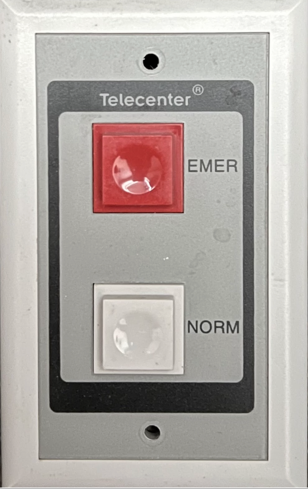
To place a call to the front office, press the gray Normal Call-in button once and listen for an audio tone or beep over the speaker to confirm that you have successfully placed a call.
Next, wait for someone to answer the call in at one of the console phones at the front office. When they answer your call in, you will hear a long beeeeeep tone come from the speaker.
For an emergency or urgent help from the front office, please hit the RED Emergency Call-in button and listen for the audio tone from the speaker to indicate that you have placed a call.
If you need to escalate your normal call, you can press the normal button again or the emergency button(need to verify this) to escalate the call to the front office as an emergency.
If you did not hear a beep when pressing either of the buttons, please press the button again and listen for the tone immediately after you have pressed the button. If you still hear nothing and the office does not answer, please seek help via another source. When you get the chance, please put in a work order ASAP so that we can look into the issue.
Tip: Please try calling up to the front office at the beginning of the school year before kids come back to make sure your call button and speaker work. Sometimes, things break or work is done that may have caused your speaker or call button to not work.
Note: We do actively monitor the speakers to make sure they are online, but please let us know if you experience any issues.
When talking with someone from the front office over your speaker, prolonged audio messages will have a BEEP sound every 10-15 seconds. (need to verify)